Configuring Thunderbird✯
You can configure your mailbox in the Thunderbird software, which is the recommended mail client at ISIMA/LIMOS. You can also configure your calendar and address book.
Installation✯
Windows and Mac✯
Go to this download link: https://www.thunderbird.net/fr/
Ubuntu and Debian✯
In a terminal
sudo apt update
sudo apt install thunderbird
Configure your mail account✯
It's very simple: start by opening the Thunderbird software, then follow this sequence, adapting it to your profile:
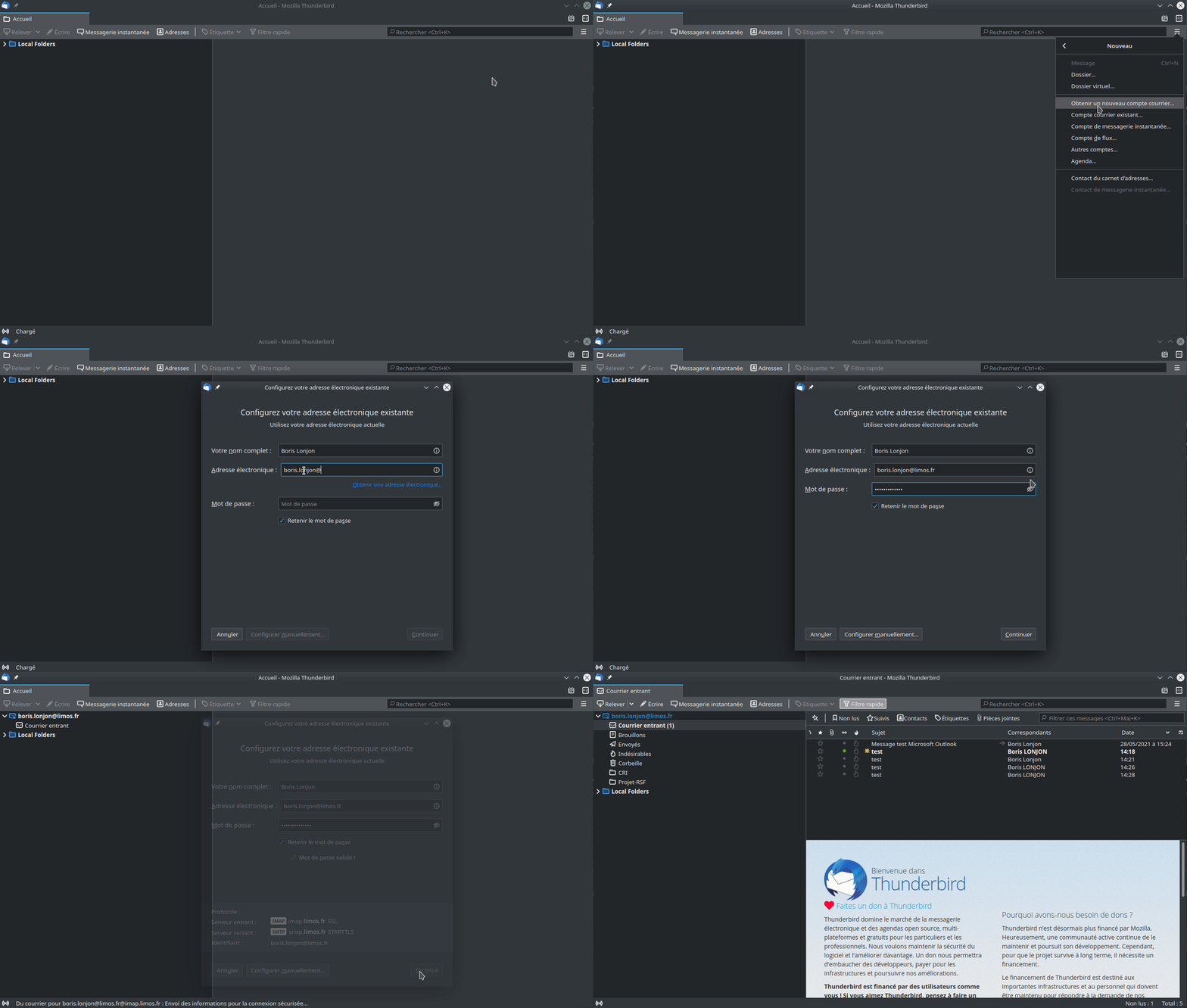
When asked for your email address, you can choose either one (@isima.fr or @limos.fr) as well as the server (mail.isima.fr or mail.limos.fr).
In any case, this is a unified mailbox and you can use either of these addresses.
The password requested is your ENT (Digital Work Environment) password
Configure your signature✯
To create your signature in Thunderbird and include an image in your signature, like this:



Use the following HTML code to create it. Remember to customize your name, first name, job title, department, email address, and phone number:
<!-- Thunderbird Signature -->
<div style="width:100%;display: inline-block;margin: 0px 0px 0px 0px;">
<div style="padding:5px 0px 0px 20px;">
<!-- INP Logo -->
<p style="float:left; font-family: arial, sans-serif; margin: 0px 5px 0px 0px;">
<span><a href="https://www.isima.fr"><img id="isima.fr" src="https://doc.isima.fr/_images/services/mail/sogo/Logo_ISIMA_INP.png" style="width:150px;" alt="ISIMA INP"></a></span>
</p>
<!-- Person Block -->
<p style="float:left; font-family: arial, sans-serif; margin: 0px 0px 0px 20px;border-left:4px solid rgb(0, 88, 155);padding: 0px 0px 0px 10px;">
<span id="templateThunderbirdNomPrenom" style="font-size: 11pt; color: rgb(0, 88, 155); font-weight: bold; ">
LASTNAME Firstname
</span><br>
<span id="templateThunderbirdDetail1" style="font-size: 11pt; color: rgb(30, 45, 70);font-weight: bold;">
Executive Secretary
</span><br>
<span id="templateThunderbirdDetail2" style="font-size: 11pt; color: rgb(30, 45, 70);font-weight: bold;">
Management Team
</span><br>
<span id="templateThunderbirdTelephone" style="font-size: 11pt; color: rgb(30, 45, 70);font-weight: bold;">
+33 4 70 40 00 00
</span><br><br>
<span><a style="font-size: 11pt; text-decoration: none; color: rgb(0, 88, 155);" href="https://www.isima.fr"><strong>ISIMA</strong></a></span><br>
<span style="font-size: 11pt;">1 rue de la Chebarde, Campus des Cézeaux, 63178 AUBIERE Cedex</span><br><br>
<a href="https://mobile.twitter.com/ClermontINP"><img id="logotwitter" style="width:30px;" src="https://doc.isima.fr/_images/services/mail/sogo/Logo_twitter.png" alt="Twitter" style="margin:5px;"></a>
<a href="https://www.linkedin.com/company/clermont-auvergne-inp"><img id="logolinkedin" style="width:30px;" src="https://doc.isima.fr/_images/services/mail/sogo/Logo_linkedin.png" alt="LinkedIn" style="margin:5px;"></a>
<a href="https://www.facebook.com/ISIMA.Auvergne"><img id="logofacebook" style="width:30px;" src="https://doc.isima.fr/_images/services/mail/sogo/Logo_facebook.png" alt="LinkedIn" style="margin:5px;"></a>
</p>
</div>
</div><br>
<!--End Thunderbird Signature-->