Documentation - My Homepage✯
General Overview✯
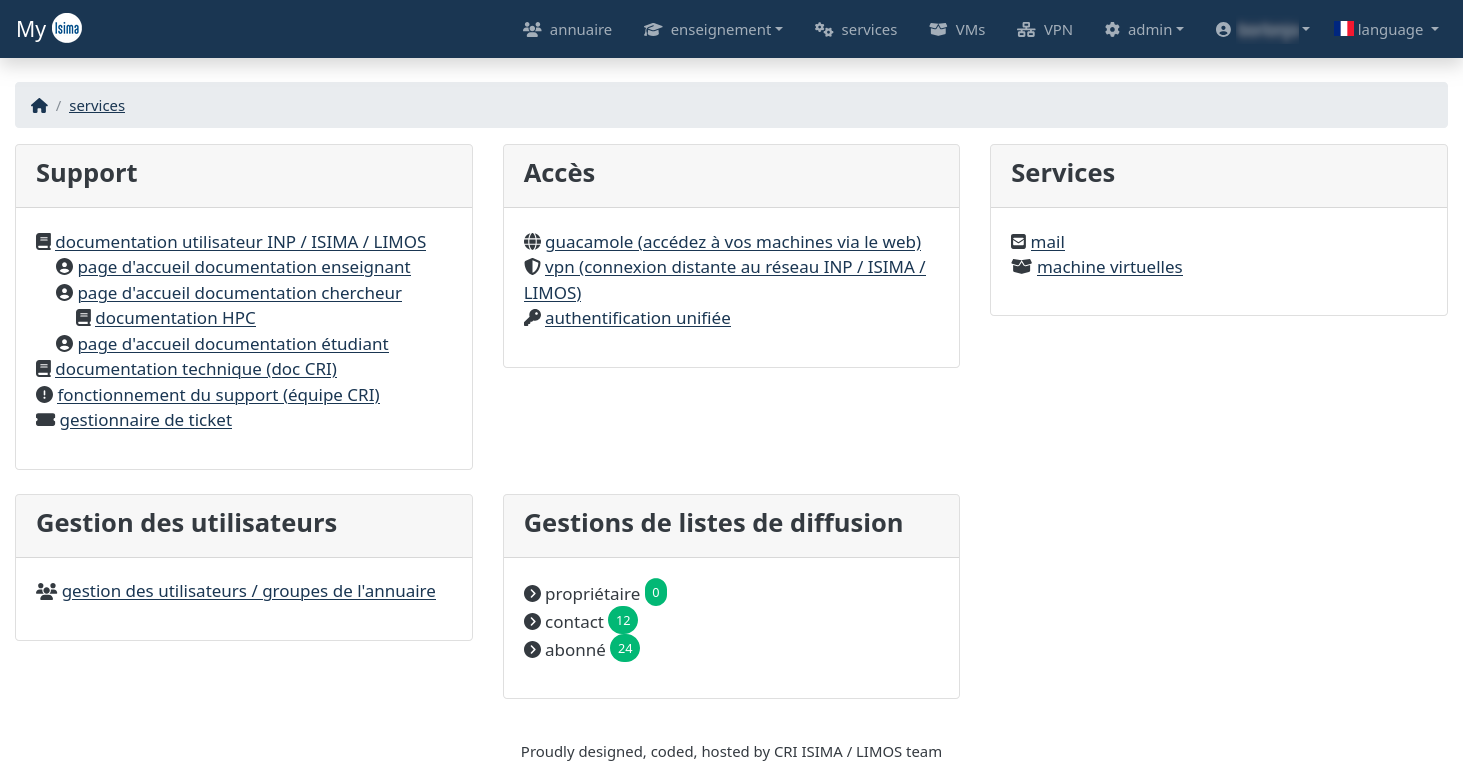
The My intranet management tool homepage provides centralized access to services, support, user management, and mailing lists. It is organized into different sections, each dedicated to a specific area. Below is a detailed description of the visible elements.
Navigation Tabs (Top Banner)✯
At the top of the page, you will find a navigation bar containing several tabs allowing quick access to the various intranet features.
- Directory (Annuaire): Provides access to user and group management within the infrastructure.
- Teaching (Enseignement): Offers access to specific resources for teachers (Syllabi and company relations).
- Services: Feature not implemented.
- VMs: Provides access to control your virtual machines.
- VPN: Allows you to retrieve VPN connection files to access the establishment's remote network.
- Admin (Admin): Section dedicated to administrators for advanced tool management.
- Username (Nom d'utilisateur): Displays account-related options such as account settings, internal regulations, and logout.
- Language: Language selector to change the interface language (e.g., here, selected in French with a French flag visible). The site is only partially translated into English.
Main Homepage Sections✯
1. Support✯
This section groups several useful links to access technical documentation and user support:
2. Access✯
This section provides quick access to several infrastructure services:
- Guacamole (access your machines via the web) (Guacamole (accédez à vos machines via le web)): Guacamole service enabling remote access to your machines via a web interface.
- Documentation for this service.
- VPN (remote connection to INP / ISIMA / LIMOS network) (VPN (connexion distante au réseau INP / ISIMA / LIMOS)): VPN configuration for secure remote connection.
- Documentation for this service.
- Unified Authentication (Authentification unifiée): Centralized authentication interface.
3. Services✯
Two main services are listed here:
- Mail (Mail): Direct link to the email service.
- Documentation for this service.
- Virtual Machines (Machines virtuelles): Access to virtual machine management.
- Documentation for this service.
4. User Management✯
This section allows management of users and groups in the infrastructure directory:
- User / group management in the directory (Gestion des utilisateurs / groupes de l'annuaire): Link to the user and group management interface.
For more information
For more details on user and group management, you can consult the dedicated section on population group management.
5. Mailing List Management✯
This section provides an overview of mailing list management roles:
- Owner (Propriétaire): Displays the number of mailing lists for which the user is the owner (here,
0). - Contact (Contact): Displays the number of lists for which the user is designated as a contact (here,
12). - Subscriber (Abonné): Displays the number of lists to which the user is subscribed (here,
24).
For more information
For more details on mailing list management, you can consult the dedicated section on mailing list management.