Projects within LIMOS✯
The LIMOS can support you during the different stages of project implementation by offering services to facilitate both functional and administrative aspects.
Project and data lifecycle✯
If a research project involves data, this data is considered research data and is subject to specific regulations.
Research data
- They are subject to a default openness principle (Open Data) except in exceptions: health data, defense data, or professional secrets.
- They must be associated with metadata.
- Proper data management aims to make them **F**indable, **A**ccessible, **I**nteroperable (understandable by humans and machines), and **R**eusable: FAIR.
- It is not the researcher but the institution (LIMOS) that owns the research data.
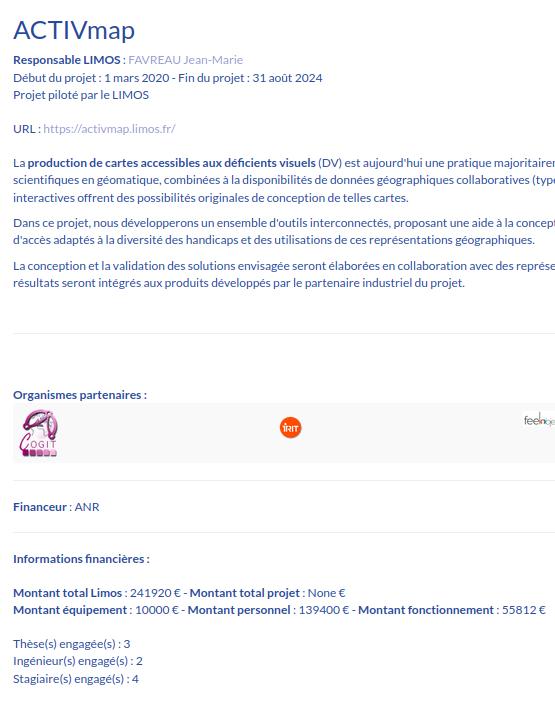
The following diagram shows the interconnection between project stages and associated data, as well as the services LIMOS offers for each of these stages.
Some of these services are directly accessible, but to benefit from all services and their full effectiveness, you must start by creating a new instance for your project on MY.
Create your project on MY✯
Why create a group for your project
- Associate LIMOS, UCA, or other members with your group.
- Benefit from a mailing list usable by all members.
- Share documents with this group via Owncloud.
Once logged in to my.limos.fr, go to the annuaire tab and the groupes sub-tab. Create a new group by clicking the green (+) button.
In the following form:
- Indicate the group name.
- Provide a project description for this group.
- Set yourself as the owner (the moderator is optional).
- Check the box corresponding to the mailing list.
- For groups, leave this blank unless you wish to create a group/project dependent on another, more significant group/project.
Once done, a request is automatically sent to the IT service for validation.
Finally, you can create new MY users for each member and associate them with the group.
Services for projects✯
Owncloud✯
During project design, it may be practical to have a tool for exchanging documents or even collaboratively editing a document (with OnlyOffice).
On owncloud.isima.fr, create a new folder and share it with the group you just created.
See also the Owncloud documentation.
Mailing list✯
Once your group is created, you (and all group members) can communicate using the email address <monprojet>@listes.limos.fr.
See also the mailing list documentation.
DMP (PGD)✯
The template mentioned below is being drafted and not yet finalized.
Data Management Plans (DMP or PGD in French) are documents that allow researchers to define a plan for properly managing project data.
Writing a DMP is mandatory in certain cases, such as for an ANR (French National Research Agency).
To facilitate its creation and because you cannot answer all questions, LIMOS offers a template to upload to the Opidor web tool.
First, create a profile on Opidor.
Then, in Mes plans/tableau de bord (My plans/dashboard), create a new plan.
Select the following options:
- Import an existing plan.
- For a research project.
- French.
- DMP OPIDOR format.
- Choose the "ANR - Structured DMP template."
Then upload the following document: template_opidor_limos.
GitLab✯
On gitlab.limos.fr, you can create repositories and share them with the members you have created.
For this, members must first log in to the GitLab interface to create a profile.
You can also create a GitLab group with the same name as the one you created in MY and invite members to it.
See also the GitLab documentation.
HPC Mésocentre VMs✯
If you need machines for your experiments, you can use:
- A virtual machine with custom specifications → Request it from the IT service.
- The HPC → See the documentation.
- The UCA Mésocentre if your needs are significant → See the documentation.
Web hosting✯
Depending on your needs, you can request from the IT service:
-
A web host for a simple project presentation in pure HTML.
- Ease of writing and deployment.
- HTML, CSS, JS.
-
A VM for a more complex project requiring specific code.
- Freedom in tools and languages.
- You are responsible for security, application evolution, and potential issues.
HAL✯
Deposit your publications in the LIMOS collection on HAL → HAL documentation.
Archiving✯
With Open Data in mind, research data must be archived and made accessible.
Researchers have several options:
data.gouv✯
data.gouv.fr is a French public data platform.
It includes an API, allows harvesting, has a support team, and offers thematic data repositories (but not for computer science).
However, the amount of data that can be deposited is limited. For datasets larger than 1 GB, the request may be refused.
Other recognized public repositories✯
The following platforms provide access to thematic data repositories (but not for computer science topics). Dataset size will also be a limiting factor (~1 GB).
UCA Archiving✯
Under negotiation
LIMOS is currently negotiating to obtain a research data archiving space.
Temporary solution✯
If you need to store a large volume of data, a VM can be created to store the data.
Contact the IT service.
Entering your project on the LIMOS website✯
When a researcher's project is accepted, they must provide certain information to the lab by describing their project on the LIMOS website.
- Log in to the LIMOS intranet and click
Administration du site(Site Administration). - Click the
+to define a new project .
. - Fill in the requested fields (fields in italics are optional):
- General info
- Title and content in French and English.
- Optional: Project URL and logo.
- Administrative info
- LIMOS project manager (usually yourself, selected from the dropdown list).
- Project coordinator (free text for external members).
- Managed by LIMOS (check/uncheck).
- Project type: national, European, international.
- Project nature (different from the funder): PIA, CPER, industrial research contracts, etc.
- Responsible organization: UCA, CNRS, etc.
- Start and end dates of the project.
- Optional: Project publication date on the website.
- Display the project on the public website: Unchecking this box will keep the project in the system but hide it from the public site.
- Financial info
- Amount of grants allocated to LIMOS.
- Optional: Total grant amount allocated to the project.
- Funder (selected from a list) and specific funder (free text if the funder is not in the list).
- Number of PhDs, PostDocs, and engineer CDDs for the project.
- Allocated amounts for personnel, equipment, and operations.
- Related organizations
- Select a partner organization.
- If the desired organization is not in the list, create a new one and then associate it.
- Axis and theme
- Indicate the axis and theme of the project manager (usually yourself).
- General info
Once completed, the LIMOS administrative services will be notified and will validate (or reject) the project.
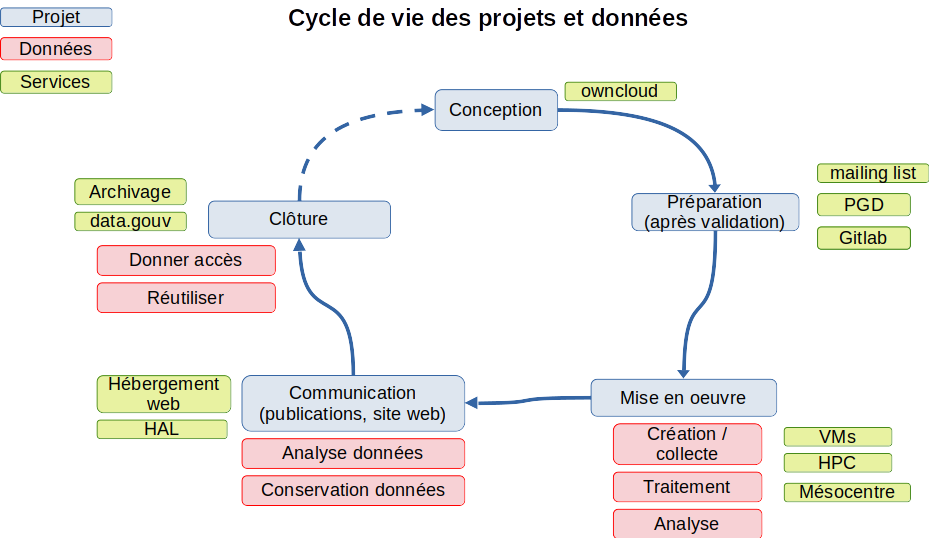
The project will then be visible on the LIMOS website, including partner and funder organizations (see example below).
Project financial information will only be visible to logged-in members.