Projects, Members, and Groups✯
The project is the organizational unit of the registry. All images belong to a project, and it is at the project level that visibility (public/private), members, quotas, and the vulnerability scanner are managed.
An image is named registry.isima.fr/<project>/<repository>:<tag>.
Creating a Project✯
Each user can create their own projects.
- Log in to the web interface
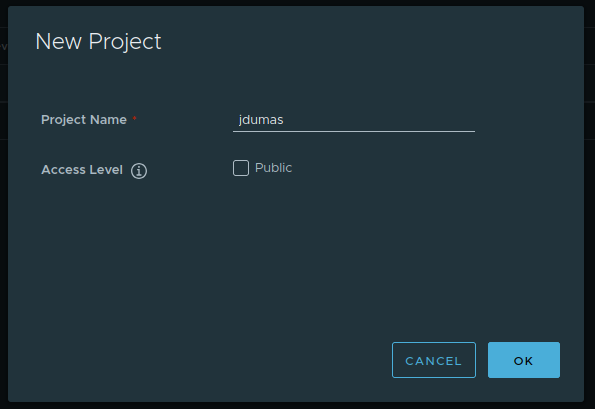
- In Projects, click NEW PROJECT
- Enter a name (in lowercase: it will become the prefix for your images)
- Choose public or private visibility (the Access Level setting)
- Confirm with OK
Public or Private Project?✯
| Visibility | Read (pull) |
Write (push) |
|---|---|---|
| Public | Everyone, without authentication | Reserved for members |
| Private | Reserved for members | Reserved for members |
Modifiable at any time
The visibility of a project can be switched from public to private (and vice versa) at any time from the Configuration tab of the project.
A public project is readable by everyone
Only push images intended to be freely shared, and without any secrets.
Adding Members and Groups✯
To share a private project (or authorize others to push to a project), add members to it from the project’s Members tab.
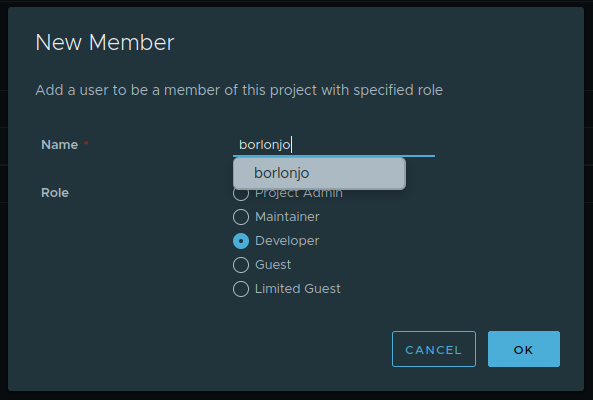
- Open your project > Members tab
- Click + USER to add a person, or + GROUP to add a group
- Enter the identifier, choose a role, then confirm
Adding a Group✯
Instead of adding members one by one, you can add an entire group (personal group, student group, project team, etc.). All members of the group then inherit the assigned role, greatly simplifying access management for a class or team.
Group management
Groups come from the establishment’s directory. Creating and managing your groups is done via the MY interface.
Project Roles✯
The role assigned to a member (or group) determines what they can do within the project:
| Role | Main Permissions |
|---|---|
| Limited Guest | View and pull images. Cannot see the list of other members. |
| Guest | View and pull images, see members and vulnerabilities. Read-only. |
| Developer | Guest rights + push images, create repositories, manage labels. |
| Maintainer | Developer rights + run scans, delete images, manage robot accounts and retention rules. |
| Project Admin | Full project rights: configuration, member management, labels, and robots. |
Reserved for system administrator
Only the registry’s system administrator can modify a project’s quotas and add new scanners. The creator of a project is automatically a Project Admin.