Clermont Auvergne University Mesocenter✯
The Clermont Auvergne Mesocenter provides researchers from UCA with a set of services including storage systems and computing resources via several infrastructures.
For more information about the Mesocenter, you can consult the website https://hub.mesocentre.uca.fr/docs/.
Registration✯
Access Request✯
-
First, go to the login page of the Mesocenter web interface https://hub.mesocentre.uca.fr/.
-
Then, click on the
Fédération Education-Recherchebutton at the bottom of the page.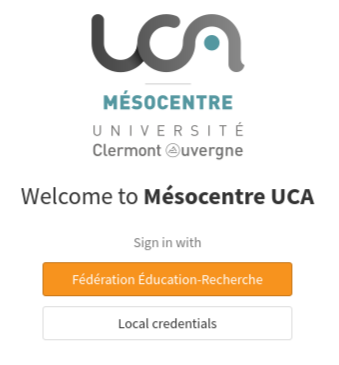
-
Next, to select your institution from the dropdown list, type
Clermontin the search bar and selectUniversité Clermont Auvergne.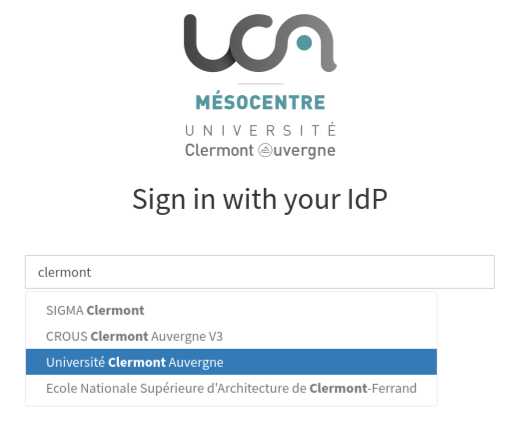
-
Log in with your Université Clermont Auvergne credentials using the
Sign in with IdPbutton.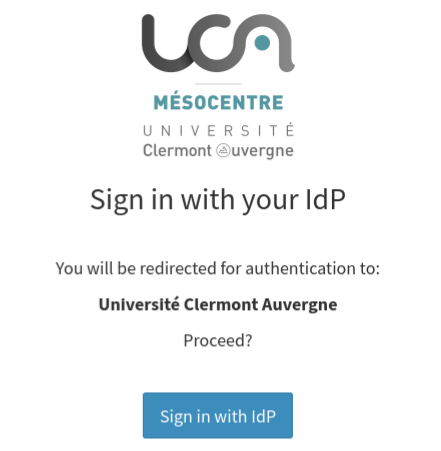
-
Once logged in, click on
Do not ask againin the consent duration list, then click on theAcceptbutton.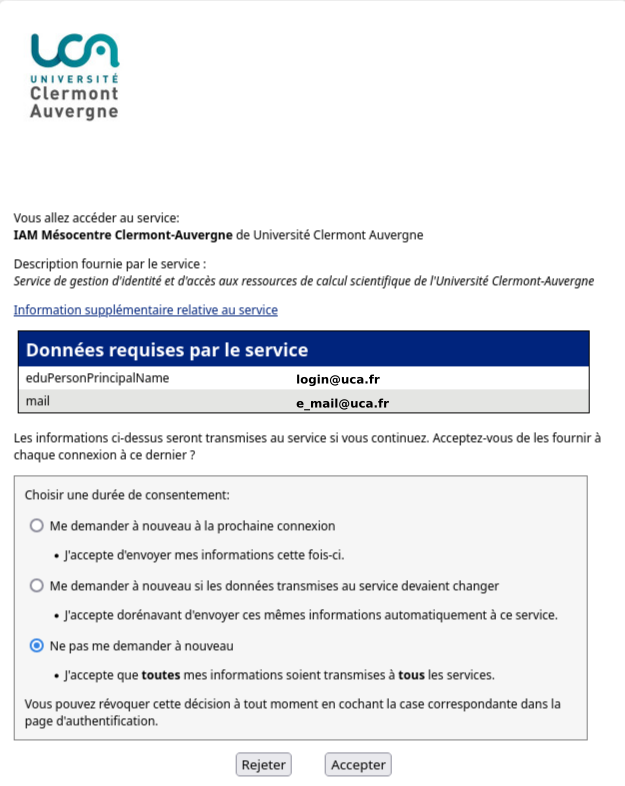
-
Finally, fill out the registration form, then click on the
Registerbutton.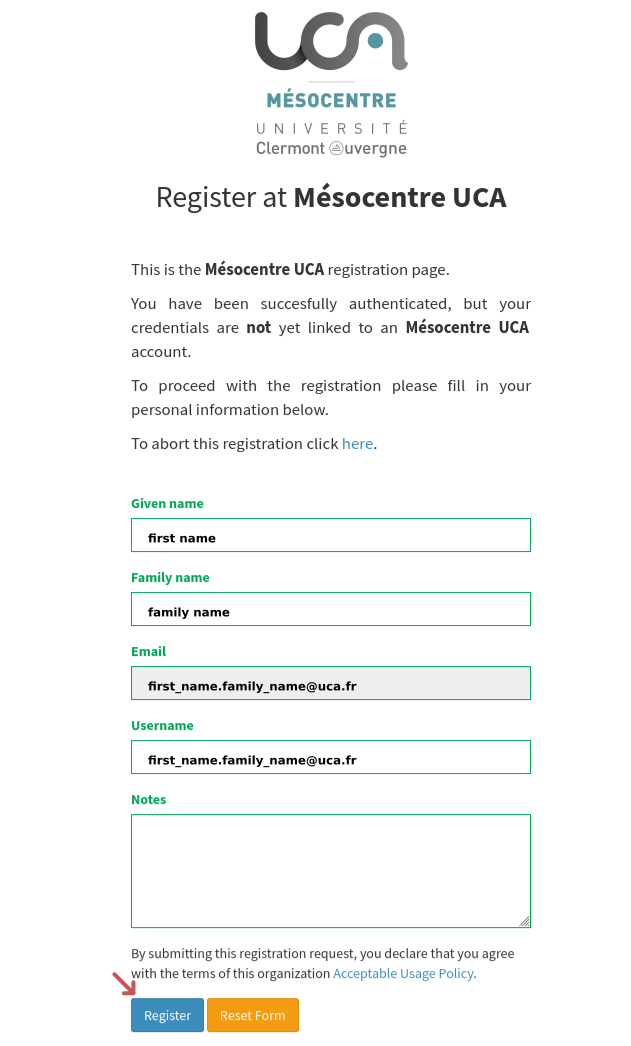
Request Validation✯
Once your access request is submitted, you will receive a confirmation email from the Mesocenter.
> Hello,
> Welcome to the Mesocenter of Université Clermont Auvergne.
>
> Your account on the HPC2 computing cluster of the Mesocenter has been created:
> Login: user_login
> Groups: user_group
>
> Password: log in to [https://hub.mesocentre.uca.fr](https://hub.mesocentre.uca.fr/) and click on "Change my password" in the first box.
Access✯
HPC2✯
To access the Mesocenter's HPC2 computing cluster, you must use ssh.
Key authentication is mandatory. Consult the documentation and upload your public key to your personal space.
Briefly, with the ssh client under Linux or MacOS, you can connect from the university network on a terminal with the command:
ssh user_login@hpc2.mesocentre.uca.fr
Under Windows, use for example the PowerShell software (included since Windows 7) to connect via ssh (see documentation).
External Connection
To connect via ssh from outside the university network, it is recommended to use the VPN provided by your host laboratory.
If this VPN is not available, it is possible to use the Mesocenter gateway from your computer https://hub.mesocentre.uca.fr/docs/cluster/ext. In this case, please contact the mesocenter again.
JupyterHub✯
To access the JupyterHub service, start a JupyterLab session on a compute node with a simple browser from https://hub.mesocentre.uca.fr/hpc-jupyter/.
S3 Storage✯
To access S3 storage from the OSCAR platform in project mode via the graphical interface, enter the address https://oscar.mesocentre.uca.fr/ in your browser.
You will find on the platform's website (https://hub.mesocentre.uca.fr/docs/) various guides describing the steps to follow, particularly for:
- connecting from a Linux or Windows workstation to HPC2
- transferring files to/from your workstation
- using S3 storage
All the software mentioned in these documents is free and freely downloadable from the Internet.
Disk Space✯
You have an initial quota of 100 GB in /home/user_login
The /storage/scratch partition has 500 GB, is shared between users, and is specific to each node.
THIS scratch VOLUME IS NOT BACKED UP AND MAY BE PURGED IF NECESSARY
It is reserved for temporary calculation files.
It is your responsibility to manage your data (organization, volume, relevance, age).
Operating Rules✯
The "HPC2" server being the access server to the platform, also called "frontend", please do not run any data processing on it, as the computing cluster is specifically dedicated for this use.
The same applies to the use of the Mesocenter gateway ext.mesocentre.uca.fr.
Support✯
For any support requests (other than information available on the website), send an email to: support@dsi.uca.fr
An electronic ticket management system allows us to track your support requests.
IT Charters✯
Important: UCA and the Mesocenter have issued an IT charter that defines the rights and duties of users of IT resources. You agree to comply with these charters. You can consult them online at the following addresses:
UCA: https://hub.mesocentre.uca.fr/docs/files/chartenum01.pdf
Mesocenter: https://hub.mesocentre.uca.fr/docs/files/chartecourte01.pdf
Publications✯
As stated in the charter, research teams undertake to thank the Mesocenter of Université Clermont Auvergne and to communicate to the Mesocenter any publications or communications when they deal with a subject that has benefited from computing and/or storage resources, using phrases based on the following models:
- "We are grateful to the Mésocentre Clermont-Auvergne from Université Clermont Auvergne for providing help and/or computing and/or storage resources".
In the context of a collaboration, you can directly cite the person(s) who participated in the project as follows: Name, Université Clermont Auvergne, Mésocentre Clermont-Auvergne, F-63000 Clermont-Ferrand