~# Backup of Linux workstations~
OBSOLETE✯
General Framework✯
SMB shares are available on the network, on a server named dirs which groups together the various personal spaces for each user. They allow for the backup of workstations. Currently, the available quota is 100 GB for internal staff of the Institute and 5 GB for students and external staff.
These SMB shares are authenticated using the username and password from the university’s directory. For us to be able to authenticate you, your password must have been changed since July 2017. If not, go to the UCA portal: here. Log in and go to "My Account" / "Login and Security" to change your password.
The idea is to define a folder in your personal space that will be used to store your backups. To facilitate security on these backup spaces (synchronization with other servers, antivirus checks), please name this directory sauve (backup).
Backup Client✯
The recommended client is the default one provided on Ubuntu: deja-dup. We will consider that support will be provided for the recommended tool.

You can launch this backup client by searching for it in the applications or by typing deja-dup in a terminal.
Configuration✯
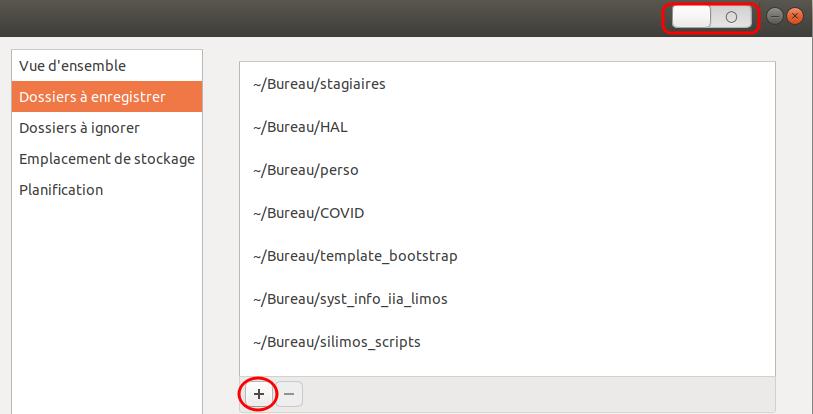
In the second tab, you can select the folders you wish to back up and add more by clicking +. The button at the top right allows you to enable automatic weekly backups.
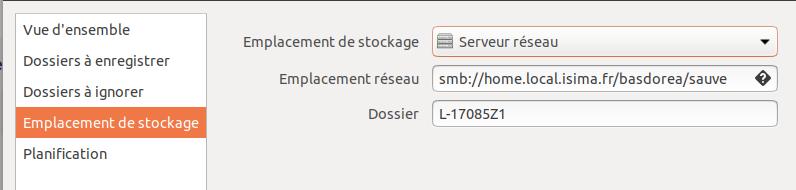
In the fourth tab, you must specify the share you defined earlier, i.e.:
- Storage location:
Network server - Network location:
smb://dirs.local.isima.fr/basdorea/sauve - Folder: you can leave the default name or add one.
Finally, in the fifth tab, you can define the frequency of your backups.
For all useful purposes, the storage server is quartz.rcisima.isima.fr.
The accessible directory is named after your UCA username.
Credentials:
- UCA directory username
- UCA directory password
It would be wise for the Samba share to be mounted on-the-fly by the backup tool. It does not seem prudent to leave the share permanently mounted.