Authentication to the registry✯
The registry distinguishes two authentication methods depending on whether you use the web interface or the command line.
| Context | Username | Password |
|---|---|---|
| Web interface (registry.isima.fr) | UCA account (SSO) | UCA password |
Command line (docker login) |
Your username | CLI secret (not the UCA password) |
Web interface: login via SSO✯
Access to the web interface is done via the Single Sign-On of ISIMA / LIMOS.
- Go to https://registry.isima.fr
- You will be redirected to the ISIMA / LIMOS SSO
- Authenticate with your UCA account (same as for email, Moodle, Teams…)
First login
On your first login, your account is automatically created in the registry. You can then create your own projects.
Command line: the CLI secret✯
Your UCA password does not work with docker login
Command-line tools (docker, podman, helm…) cannot handle SSO/OIDC redirection. Harbor therefore provides an alternative dedicated identifier: the CLI secret.
Retrieve your CLI secret✯
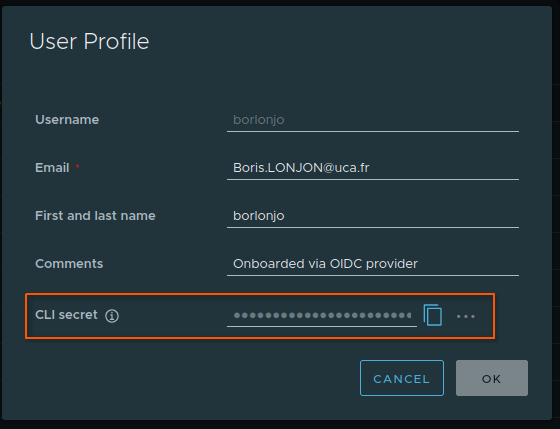
- Log in to the web interface (see above)
- Click on your username at the top right, then User Profile
- The CLI secret is displayed; click the icon to copy it
Authenticate with docker login✯
Use your username and the CLI secret as password:
docker login registry.isima.fr -u <your_login>
# Password: paste your CLI secret here
Non-interactive authentication (scripts, CI)
To avoid entering the secret interactively, pass it via standard input. This is the recommended method as it does not write the secret to the shell history:
echo "$CLI_SECRET" | docker login registry.isima.fr -u <your_login> --password-stdin
For long-term access (pipelines, servers), however, prefer a robot account rather than your personal CLI secret.
Regenerate your CLI secret✯
If your secret is compromised or lost:
- In User Profile, click the … icon
- Choose to automatically generate a new secret, or enter one manually
Only one CLI secret at a time
Each user has only one CLI secret. As soon as a new secret is generated, the old one is immediately invalidated: remember to update your existing docker login commands.
The CLI secret is linked to your OIDC authentication token
Harbor automatically refreshes this token, so the CLI secret remains valid even after expiration. However, if the refresh fails, the secret becomes invalid: log back in to the web interface via SSO so Harbor can obtain a new token and reactivate the secret.